
How it works · One working shift
The shift is long. The information can’t wait.
Toolbox starts at 05:00. The shift finishes at 18:00. Between the two, every delivery creates information the rest of the team needs.
Four roles, one delivery
Who needs that information.
Site engineer / supervisor
Receive the supply. Finish at 18:00 without a pile of dockets to scan.
Uses: App · Today
Project engineer
Check today’s quantities and productivity in the project tracker.
Uses: Tracker · CSV
Senior project engineer
Understand today’s results before planning the next shift.
Uses: Reports
Cost admin
Start tomorrow’s goods receipts with the evidence already available.
Uses: PDF · Goods receipts
Capture once at receipt. Keep the information moving.
One delivery, Friday to Tuesday
An illustrative journey: book ahead, capture during the shift, use the records across the team.
Book Monday’s supply
Friday 10 Jul · In the office
- Project engineer
- Web
Booked on the cost code.
Book Monday’s 32 t of DGB20 against Base course, CS.PV.BC. Select the supplier and work resource from your project libraries.
- Office → site
- App
Assigned before it arrives.
The site engineer receives the booking in Today. Supplier, resource, expected quantity and cost code travel with it.
Receive on site
Monday 13 Jul · At the gate
Photograph the docket. AI reads it. You certify what arrived.
- Toolbox · Shift starts
Know what’s coming.
Today’s booked deliveries are already assigned to the site team, with their cost codes.
- Site engineer / supervisor
- App
The truck’s at the gate.
Open Today and select the delivery that arrived. The booking gives the docket its project context.
06:52TODAYSWRiverside QuarterTODAY’S PROGRESS0/ 14 certified0 done14 pending0 partial0 postponed4-day clear streak· clear today’s list to keep itCertify a deliveryNot in today’s list? Start hereAssigned to you today14 to certifyTo certifyDGB20 road baseCS.PV.BC32 tToday · 06:55To certifyN32 concrete · 20 mmCS.DR.PT5.2 m³Today · 07:30To certifyRCP 375 stormwater pipeCS.DR.SW12 EAToday · 08:15To certifyTo certifyDGB20 road baseCS.PV.BC32 tToday · 06:55DGB20 road baseCS.PV.BC · 3 deliveries today2 / 306:55DKT-4471-A32.48 tCertified09:30DKT-4478-A31.90 tCertified12:30Next truck32 tTo certifyEach docket, its own certificate64.38 of 96 t- Photo → delivery details
- App
Photograph. Review.
AI extracts the supplier, docket number, material and quantity. Check the details against the docket and what actually arrived.
6:53Review deliverySTEP 2 OF 3 · REVIEW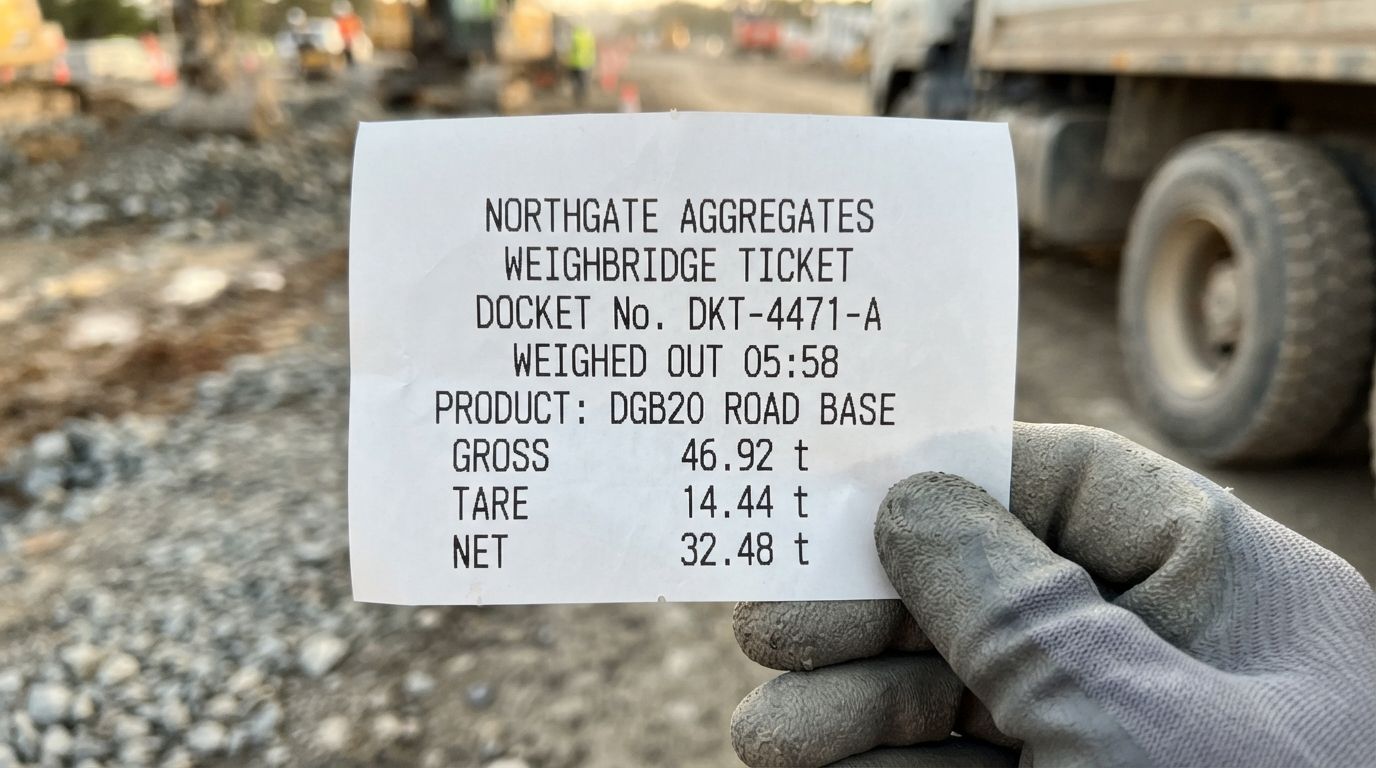 DOCKET1 photo · tap to viewDelivery detailsread-only · tap mic to fixSUPPLIERNorthgate AggregatesDOCKET №DKT-4471-AMATERIALRoad baseGRADE / SPECDGB20QUANTITY · NET32.48 tDELIVERY DATE & TIMEToday · 06:52COST CODECS.PV.BCQUANTITY · NET32.48 t
- Site engineer / supervisor
- App
Certify what you accepted.
Record full, partial or rejected supply. Confirm the accepted quantity and explain any discrepancy.
06:54CertifiedCERTIFIEDLOG #4471DGB20 road baseNorthgate Aggregates Pty Ltd · 32.48 t · Docket
DKT-4471-A2 photos — docket & materialSIGNATURESam WhitfieldSite Engineer · Riverside CivilCERTIFIED13 JUL 2026CERTIFIED AT13 Jul 2026 · 06:54LOCATION (GPS)33.8150° S, 151.0011° EINTEGRITYSigned on device · syncedView logBack to TodayMaterial photographedDocketMaterial · just nowHold to certifyCertified · 32.48 t · DGB20HOLD 1.5sSigned under your name

Several loads? Certify each docket against the same resource. Unbooked supply can be captured and allocated by the office later.
Validate in the office
Monday 13 Jul · Minutes later
The certified delivery is already in the office, with its evidence.
- Site → validation queue
- Web
Already in the office.
The certified delivery reaches the reviewer with its docket photo, named certification, accepted quantity and cost code.
Riverside QuarterValidation queueSearch logs, suppliers…SHOWTo validatePartialPostponedUnallocatedValidatedBy statusBy assigneeListBoardThis weekTo validate4DGS20 subbaseCS.PV.SBtoday 06:41CERTIFIEDJOJ. OkaforN32 concrete · 20 mmCS.ST.FTyesterdayPARTIALDRD. ReyesBedding sandCS.DR.SW2 days agoCERTIFIEDDRD. ReyesExcavator hire — 20 tPostponed3Precast pit · 900 × 900CS.DR.PTyesterdayPOSTPONEDSWS. WhitfieldKerb & channelCS.PV.KC9 days agoPOSTPONEDDRD. ReyesUnallocated2Excavator hire — 20 tCS.PV.EWyesterdayUNALLOCATEDTAT. AbaraBedding sand — 18 tCS.DR.SW5 days agoUNALLOCATEDTAT. AbaraValidated28DGB20 road baseCS.PV.BCtoday 06:54CERTIFIEDVALIDATEDSWS. WhitfieldSL82 reinforcing meshCS.ST.FTyesterdayVALIDATEDDRD. ReyesRCP 375 stormwater pipeCS.DR.SWyesterdayVALIDATEDJOJ. OkaforDGB20 road baseCS.PV.BCtoday 06:54CERTIFIEDVALIDATEDSWS. Whitfield- Authorised reviewer
- Web
Evidence beside the fields.
Review the record. Approve it or send it back for correction while the delivery is still fresh.
 Delivery CertificationHomeProjectsValidation queueSuppliersCost codesWork resources17SWA. MarshallSenior PE · ValidatorRiverside QuarterValidation queueValidation queue06:40Excavator hire — 20 t06:54DGB20 road base07:02Kerb units — barrier07:11Geotextile — 200 gsmDGB20 road baseLog 4471 · CS.PV.BC · S. Whitfield · today 06:54VALIDATED2 photos — tap to viewSIGNATURESam WhitfieldGPS · TIME33.8150° S, 151.0011° E13 Jul 2026 · 06:54:12 · syncedSUPPLIERNorthgate AggregatesDOCKET №DKT-4471-AMATERIALRoad baseGRADE / SPECDGB20QUANTITY32.48 t — planned 32DELIVERY DATE & TIMEToday · 06:52COST CODECS.PV.BCAdvancedVehicle · Gross · Tare · Weighed out · Refs +1Validated by A. Marshall · today 07:20
- Daily export → SharePoint
Filed for the whole team.
The daily export brings delivery photos and PDF certificates into your project’s SharePoint folder, alongside a CSV of certified resource lines.
DELIVERY CERTIFICATECERTIFIED IN FULLDOCKET №DKT-4471-ASUPPLIERNorthgate AggregatesPROJECTRiverside Quarter · Package CCLIENTKestrel Bay DevelopmentsLINE ITEMS№MATERIAL / GRADECOST CODEQUANTITY1DGB20 ROAD BASECS.PV.BCPavements — base course32.48 tCERTIFICATIONDELIVERED13 Jul 2026 · 06:52CERTIFIED BYS. Whitfield · Site EngineerCERTIFIED AT13 Jul 2026 · 06:54 AESTLOCATION (GPS)33.8150° S, 151.0011° EVALIDATED BYA. Marshall · Project EngineerVALIDATED AT13 Jul 2026 · 07:20 AESTOUTCOMECertified in full — no varianceDECLARATIONThe signatory confirms the material described above was received on site, checked against the supplier docket and certified in the quantity and condition recorded. Photographic evidence is attached on the pages that follow.Issued by BUCOF · 13 Jul 2026 · 07:20 AESTS. WhitfieldS. WhitfieldSite Engineer · CertifierSigned at certification · 13 Jul 2026 · 06:54 AESTAUDIT TRAILEVIDENCE13 JUL 202606:53S. WhitfieldDocket captured — 1 photo06:53BUCOF AIDraft read from docket: supplier, docket №, material, grade, quantity06:54S. WhitfieldCertified in full on device · signature captured06:54BUCOFSynced · files written to SharePoint07:20A. MarshallValidated (PE) — no query raised07:20BUCOFCertificate issuedfull size on the pages that follow…_docket_1.jpgp. 2…_material_1.jpgp. 3Docket DKT-4471-A · Northgate Aggregates Pty Ltd · 13 Jul 2026 · Riverside Quarter — Package CPage 1 of 3VALIDATED BYA. MarshallA. Marshall · Project EngineerValidated in BUCOF · 13 Jul 2026 · 07:20 AESTCost tracker · Riverside Quarter.csvSharePoint › Riverside Quarter › Cost trackingUPDATED 17:00DATEDOCKETCOST CODERESOURCEQTYUNIT09 JulDKT-4386CS.PV.SGDGS20 subbase28.10t10 JulDKT-4398CS.PV.BCWater cart hire — 13 kL8hr13 JulDKT-4471-ACS.PV.BCDGB20 road base32.48t+1 row appended to your existing trackerWBS-coded · opens in Excel
Use today’s records
Monday 13 Jul · Before the shift ends
Use today’s records before tomorrow starts.
- Project engineer
- Web
Check the day’s quantities.
Use the CSV in your existing tracker to check supplied and remaining quantities. Combine it with production and cost data to assess today’s productivity.
- Senior project engineer
- Web
Plan the next shift.
Review delivery status and outstanding records. Use the team’s updated tracker to decide what tomorrow needs.

Use Today and the validation queue for current delivery status during the shift. Summary reports refresh nightly.
Monday 13 Jul · End of the shift
- Shift finishes
Head home. The record stays.
Dockets captured during the shift are already shared. The next team can use them without waiting for someone to scan a pile of paper after work.
Tuesday 14 Jul · Next morning
- Cost admin
- Web
Start goods receipting.
Open yesterday’s evidence and certified quantities. Check the PO, prepare goods receipts in your accounting system and match supplier invoices as they arrive.
At claim cut-off, the delivery evidence is already there.
Claim readiness also depends on purchase orders, invoices, goods receipts and the contract’s requirements.
Built for the site
Gloves on. Work goes on.
Built for gloves, glare and noise.
Roadmap
Next on site.
Where we’re taking BUCOF Capture next.
Live today
Capture, certify, validate, file
Book on the cost code, certify at the gate, validate in the office, export PDF and CSV to SharePoint.
Planned
Offline capture
Capture delivery information without a connection. Sync when you’re back online.
Planned
Integrated cost & quantity tracker
Bring certified quantities and associated costs into one tracker within Capture.
Planned
DAO-signed supplier certificates
Generate supplier certificates with a DAO signature to support payment claim submissions.
Planned features · Release dates to be confirmed
See it on your next delivery.
We’ll walk you through booking, site certification and the records your team receives afterwards.